Game Automation Software
Automate Almost Any Windows® Game
Do you wish you could eliminate repetitive in-game tasks, or do you need a little help to take your gameplay from average to awesome? If you do then Chimpeon is the perfect gaming partner that automates actions in almost any Windows® game.
Almost anything that can be performed using a mouse click or keystroke can be automated by Chimpeon with ease. Whether you want to perform a combat rotation in an MMORPG, smash a button in a clicker game, Chimpeon has the tools to make it happen. Simply configure the conditions that must be satisfied before a key or mouse button is pressed then hit Chimpeon's Start button to begin automation.
Visit the chimpeon.com website and join the thousands of users who have discovered that automating a game has never been simpler!
Benefits and Features
Reasons to choose Chimpeon as your game automation solution
Easy to Use
Chimpeon enables the automation of in-game actions in minutes without the need to write scripts or use additional third-party software.
Trigger Happy
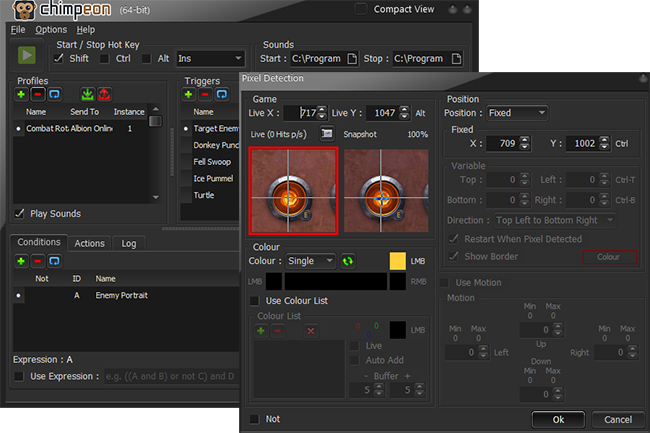
Chimpeon performs actions when a timer expires, a pixel is detected (or not), a thread becomes inactive, a date/time is reached, and more.
Almost Any Game
Chimpeon works alongside many Windows® games including MMORPG, RPG, FPS, browser, Roblox, Store, and Android (emulated).
Cost Effective
Avoid paying extortionate fees to automate your gameplay by choosing a payment plan from as little as $0.05 per day.
Undercover Operative
Chimpeon is one of the safest ways to automate a game because it doesn't alter game files, memory or CPU processes, and includes mechanisms to avoid detection.
Super Fast
Chimpeon's tiny footprint and efficient coding helps to ensure the detection of pixels and the response to other in-games conditions is lightening fast.
Precision Logging
While Chimpeon is started, everything it does is written to a log so you can conveniently see what happened and when it happened - great for optimising.
Do Almost Anything
Configure Chimpeon to press a key, perform a mouse action, perform a macro, play a sound, send a text string, and stop and start all actions.
Streaming Ready
Chimpeon works alongside popular streaming solutions so games running remotely on another computer can be automate - great for safer automation.